Join 500+ restaurants across Zimbabwe

Modernize Your Restaurant with
Smart QR Ordering

Eliminate wait times, reduce errors, and boost revenue with contactless ordering. Complete restaurant management platform built specifically for Zimbabwe.

No app downloads required
Setup in 5 minutes
Works on any device

No credit card required • Cancel anytime
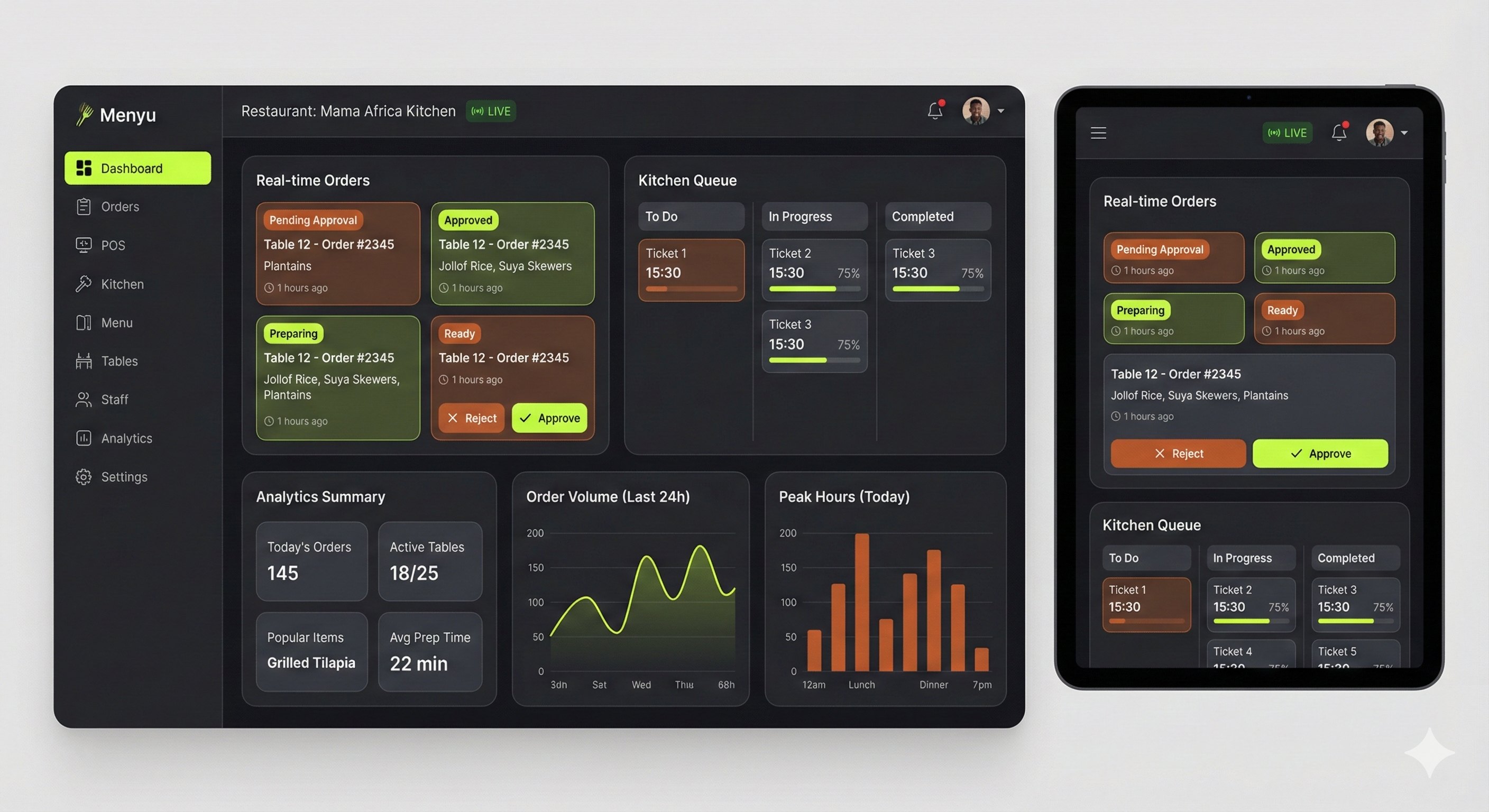
Menyu Restaurant Management Dashboard showing real-time orders, kitchen queue, and analytics

Live Dashboard & Analytics

Real-time orders, kitchen queue & insights

TRUSTED BY LEADING RESTAURANTS

Zim Cafe
The Braai House
Victoria Falls Bistro
500+ More

Why restaurants choose Menyu

Real results from real restaurants using our platform

3x

Faster Service

Tables turn over 3x faster with instant QR ordering. No more waiting for servers to take orders.

40%

Higher Revenue

AI-powered upsells and faster table turnover boost average revenue by 40%.

95%

Order Accuracy

Eliminate miscommunication. Orders go directly from customer to kitchen with 95%+ accuracy.

Everything you need in one platform

Powerful features designed specifically for Zimbabwe restaurants

Instant QR Ordering
Customers scan, browse menu with photos, and order instantly. No app downloads, no friction.
Real-Time Kitchen Dashboard
Orders appear instantly on kitchen screens. Track preparation status and keep everything organized.
AI-Powered Insights
Get personalized recommendations on pricing, menu optimization, and customer preferences using AI.
Advanced Analytics
Track sales trends, peak hours, popular items, and revenue metrics in real-time dashboards.
Customer Reviews & Ratings
Collect feedback directly through the system. Understand what customers love and improve continuously.
Custom Branding
White-label solution with your colors, logo, and branding. Make it truly yours.

Loved by restaurant owners

See what our customers have to say

"Menyu transformed our restaurant. We've seen a 45% increase in orders and customers love the convenience. Setup was incredibly easy!"

Sarah Ncube

Owner, Zim Cafe

"The kitchen dashboard is a game-changer. No more lost orders or confusion. Everything is organized and we serve customers faster."

Tendai Moyo

Manager, The Braai House

"The AI insights helped us optimize our menu and pricing. We discovered which dishes to promote and removed items that weren't selling. Revenue is up 30%!"

Mike Chikwanha

Owner, Victoria Falls Bistro

Simple, transparent pricing

Choose the perfect plan for your restaurant. All plans include 14-day free trial.

Starter
Perfect for small restaurants
$29/month
  • Up to 50 menu items
  • Unlimited QR codes
  • Basic analytics
  • Email support
Popular
Professional
For growing restaurants
$79/month
  • Unlimited menu items
  • Unlimited QR codes
  • Advanced analytics
  • Priority support
  • Staff management
Enterprise
For restaurant chains
Custom
  • Everything in Professional
  • Multiple locations
  • Custom integrations
  • Dedicated support
  • SLA guarantee

How It Works

Get your restaurant up and running in minutes with our simple setup process

1
Sign Up & Setup Your Restaurant
Create your account and complete the initial setup. Enter your restaurant name, choose a unique slug (URL identifier), and configure basic settings. The system automatically creates your admin account and generates a 14-day free trial.
2
Invite Your Team

From the Settings tab, invite staff members by email or generate invite codes. Assign roles:

  • Admin - Full access to all features and settings
  • Manager - Manage menu, orders, and view analytics
  • Kitchen Staff - Access kitchen dashboard to view and update orders
  • Waiter - View orders and table assignments

Invited users receive an email with a secure link to accept the invitation and create their account.

3
Build Your Menu

Navigate to the Menu tab and create your digital menu:

  • Add categories (Appetizers, Main Courses, Desserts, Drinks, etc.)
  • Create menu items with names, descriptions, prices, and photos
  • Mark items as available/unavailable in real-time
  • Set dietary information and allergen warnings
  • Organize items by popularity or custom order
4
Setup Tables & Generate QR Codes
In the Tables tab, add your restaurant tables with numbers or names (e.g., "Table 1", "VIP-A", "Patio-3"). The system automatically generates unique QR codes for each table. Download and print these QR codes, then place them on your tables. Customers simply scan to view your menu and place orders instantly.
5
Manage Orders & Kitchen Operations
View incoming orders in real-time from the Orders tab. Kitchen staff can access the dedicated Kitchen Dashboard (at /kitchen) to see all pending orders, mark items as preparing, ready, or served. Orders update in real-time across all connected devices using WebSocket technology for instant synchronization.
6
Track Analytics & Grow Your Business
Use the Analytics tab to understand your business performance. View revenue trends, popular menu items, peak hours, customer ratings, and AI-powered insights. Export reports, track daily/weekly/monthly performance, and make data-driven decisions to optimize your menu and operations.

Need Help?

Once logged in, look for the Help (?) button in your dashboard for detailed instructions on every feature, troubleshooting tips, and best practices for running your restaurant efficiently.

Frequently Asked Questions

How quickly can I get started?
Most restaurants are up and running in under 5 minutes. Simply sign up, add your menu items, and generate QR codes for your tables. No technical expertise required.
Do customers need to download an app?
No! Customers simply scan the QR code with their phone camera and the menu opens instantly in their browser. Works on any smartphone without downloads.
Will this work with my existing setup?
Yes! Menyu integrates seamlessly with your current operations. You don't need to change your POS system or payment methods. We complement what you already have.
What if I need help or have questions?
We provide full customer support via email, phone, and in-app chat. Professional and Enterprise plans include priority support with faster response times.
Can I customize the look and feel?
You can customize colors, add your logo, and brand the entire customer experience to match your restaurant's identity.

Built for Zimbabwe's restaurants

Our Mission

Menyu was created to help Zimbabwean restaurants modernize their operations without complex technology or expensive infrastructure. We believe every restaurant deserves access to powerful digital tools.

Why Choose Menyu

We understand the unique challenges of running a restaurant in Zimbabwe. Our platform is optimized for low bandwidth, affordable pricing, and designed specifically for the local market.

Ready to modernize your restaurant?

Join hundreds of Zimbabwe restaurants already using Menyu. Start your free 14-day trial today, no credit card required.

Get in touch

Have questions? We'd love to hear from you.

Or email us directly at hello@menyu.co.zw